
Custom Excel Spreadsheet Automation Services
CES builds custom Excel spreadsheet automations that eliminate repetitive work, reduce errors, and connect Excel with the systems your business already uses. We automate data imports and exports, report generation, data transformation, calculations, document creation, and integrations with platforms such as QuickBooks, Salesforce, SAP, HubSpot, SQL databases, and cloud-based applications. Professional custom Excel automation solutions from CES provide your business with advanced, reliable automations you can count on. Our team focuses on professional design, development, implementation, and support to make sure you get the right solution that keeps your business operations running smoothly for years to come.
Our Excel Automation Services
At CES, we have been providing professional-grade Excel automation services for over a decade, serving more than 1,000 clients with tools that improve the efficiency and effectiveness of their operations.
Our white-glove service begins with an in-depth consultation where we help uncover and identify our client’s objectives, priorities and constraints. These consultations often lead to critical insights not previously considered by the client, which leads to substantially improved outcomes long-term.
Once we receive the green-light to proceed with development, we use best practices in coding and software engineering to develop a robust system that does exactly what our client needs, leveraging the shell and user interface of Excel to deliver custom-software results with great efficiency. We also review project progress with our clients as needed to ensure alignment with their goals.
After development, we work with our clients to promote proper implementation / deployment as the project goes live. After full implementation, we remain available for long-term support to ensure the tool(s) and system(s) continue to operate smoothly.
Common Excel Sheet Automations
We take your existing Excel, Google Sheets, or Power BI workflows and transform them into professional-grade tools with automation, error-proofing, and documentation built in. We also build engineering solutions from scratch, fully customized to the way your team works and thinks.
Data Import:
Automating the process of getting data from other sources into Microsoft Excel. This could include other spreadsheets, external databases (SQL), data stored in the cloud/web, or from other platforms like Quickbooks, Salesforce, SAP and Hubspot. Automating data import results in reliable, complete importation with little or no human effort and eliminates tedious copying and pasting from one source to another.
Data Export:
Automating the process of getting data out of Excel. Automating this process typically involves extracting data, transforming it and exporting it into the desired format. One common example involves preparing import files for other software platforms that have specific criteria for importing (txt, csv, flat file, etc.,).
Report Generation:
Automating report generation and distribution. This may involve scripts that create documents such as proposals (pdf/word), pitch decks (powepoint), or tabular summaries with or without visuals. In addition to automating the generation of reports, we can often automate the dissemination via email or even text message. Solutions like this will automatically send reports to specified recipients on command or at certain intervals. Examples include payroll summaries, commission reports, sales performance metrics, forecasting and shipping/receiving.
Data Transformation & Analytics:
Automating data cleanup, adjustments and analysis. Excel can be used to transform data by removing blanks, trimming, combining, and/or rearranging raw data to get it in a usable form. It can also be used to run repeatable analytic tasks by filtering, sorting and extracting insights from data with the click of a button.
Why Businesses Choose CES for their Custom Excel Automation Projects
Businesses continue to choose CES for their Excel automation projects because their business operations (payroll, estimating, analytics, data visualization, etc.,) are too important to get wrong and they don’t just need something that works today— they need systems and tools that are designed to grow with their business and that can support them for years to come.
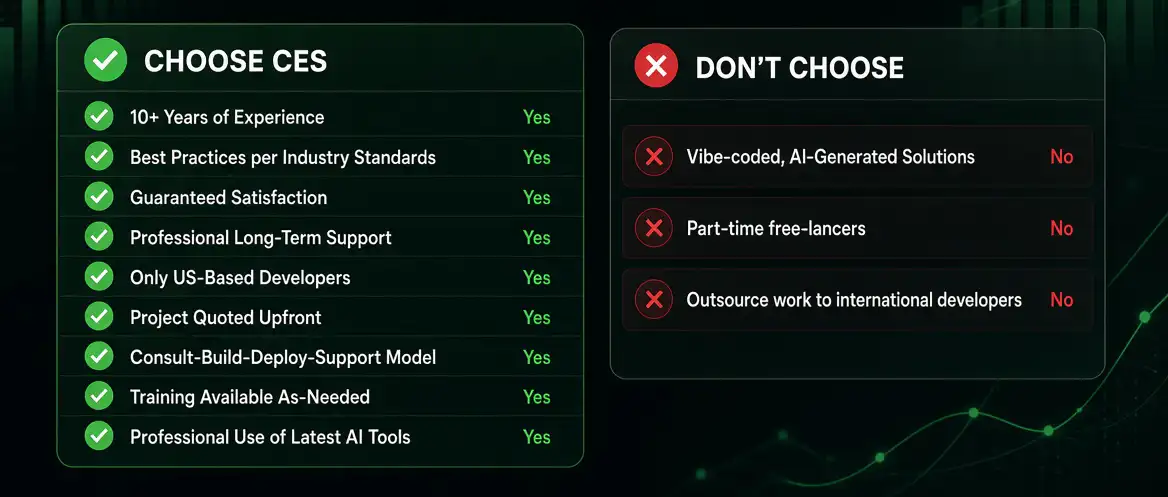
If you’re looking for professional-grade solutions from a long-term partner who is committed to your success, CES is the way to go.
Business Excel Spreadsheet Automation Case Studies
Rose Creek Golf Club: Payroll Automation with Complex Tip Calculations
In order to accurately process payroll, the team at Rose Creek had to export data from ClubSpot and their employee timesheet software, then spend hours every week cleaning up the data and copying and pasting bits and pieces to different sheets where the relevant calculations could be made to determine how tips should be distributed across team members.
Since the club had multiple POS locations and multiple shifts with different rules, processing payroll each week became a nightmare that consumed 10+ hours every week. Using Microsoft Excel, we developed a smart tool that consumed the export files from both software platforms and performed all of the data transformation and calculations automatically, complete with anomaly identification and checks to ensure payroll calculations were running accurately and nothing was missed. What used to take 10+ hours weekly is now a 30 to 60 minute process each week, saving approximately 500 hours of work annually.
Crunch: Auto-Generation of Accounting Reports
In order to generate the necessary accounting reports, the accounting team at Crunch had to combine data from an invoicing system with data from a separate employee system. This involved manually copying and pasting data from these disparate systems and tediously matching up the records so that the reports could be constructed manually using the combined data then uploaded into their accounting software. We developed a tool which allows them to import the employee and invoice data with the click of a button. The tool then automatically pairs records accurately and generates the accounting reports in the correct format so that they are upload-ready. What was a 4 to 5-hour task now takes less than 30 minutes.
Ag Dynamics: Field-to-Office Data Collection & Management
For businesses with field operations that collect information in the field, getting that data consolidated and integrated into a single, usable system at the office can be a major hassle. Before working with CES, Ag Dynamics’ field personnel would take notes on their phone in the field and text those back to someone in the office. That employee would then copy the information over to a workbook to manually generate invoices for the quantity of chemicals consumed at each location.
We created a single system comprising two workbooks: a user-friendly sheet for field personnel to input data using their mobile device and a master sheet which consolidates all of the data from the field and uses it to generate invoices without the need for manual entries or adjustments. A process that previously took several hours throughout the course of each billing cycle can now be completed in less than an hour and with greater confidence in the billing accuracy.
Garden City Realty: Automated Contract Generation
Garden City Realty helps rental property owners generate rental contracts. As the company grew to supporting hundreds of clients, manually building out these contracts became a major headache. We created a tool that uses their existing customer database to generate contracts automatically by auto-populating contract sections based on the information in the database. As their business has continued to grow so have the time-savings and this single investment in automation will support their operations at 5,000 clients just as easily as it does at 500.








Book A Call Today With Custom Excel Spreadsheets
How We Build Reliable Excel Automations
Successfully building out an automation project requires much more than technical knowledge about programming, APIs and Excel. Each custom automation project is a unique problem in need of an engineered solution. A solution that takes into account present and future variables, best practices, architecture, workflow and— just as important as any of these— the end user. That’s why our solutions go beyond implementing the mechanics to make X do Y and Z.
Instead, we explore the nature of the problem that automation is intended to solve and how it fits within the context of our clients’ broader operations to ensure compatibility, seamless integration and a successful implementation
Customized Solutions
Custom Excel Spreadsheet Automation FAQs
When something is automated with Excel, a series of steps are completed by the software automatically, without requiring manual human effort. While can include vba scripts (”macros”) it can also extend well beyond that with other software integrations and API calls, for example.
Automation primarily helps your business by (1) improving efficiency— getting more done in less time and at a lower cost— (2) reducing the potential for error and (3) second order benefits that come from consolidating systems, streamlining processes and/or improving communication.
Virtually any business process that operates according to a definable logic or set of rules can be automated. Excel’s familiar, easy-to-use interface and robust yet flexible design make it an excellent candidate for many business automations— especially those involving numerical data.
Yes! Our team can code and configure integrations to automate processes involving other software platforms such as QuickBooks, Builder Trend, Salesforce, SAP, Hubspot and many others.
Excel is ideal for automations involving data retrieval and transformation. Our team can automate data import from various sources then process (consolidate, transform, cleanse) that data automatically with pre-defined scripts.
The best way to verify if your business process is a good candidate for Excel automation, is to book a free call with one of our experts. We’ll discus your specific needs and provide guidance on the best direction and approach to take to achieve your desired ends.
This is a complex question and should be evaluated on a case-by-case basis. Our team has the expertise to advise on the best solution-fit for your business. To find out which solution is right for you, you can book a free consultation by clicking here.
Since all of our projects at CES are custom, pricing will depend on the project specifics. Projects are scoped and quoted upfront during the initial consulting phase with prices typically ranging from $1,000 to $5,000.
Yes! Our team’s expertise covers a wide array of automation tools, including Microsoft’s Power Automate.
Schedule a Consultation
Ready to Take Your Spreadsheets to the Next Level with Custom Automation?
Getting started with CES is easy. Just submit a request using our Contact Form , or Book a Call with an Excel automation expert on our team. From there, we’ll discuss your needs and priorities and map out a path forward to design, develop and implement the custom automation your business needs to succeed.